Debugging Guide
The platform ships two complementary debugging tools — they share the same diagnostic logic and the same AI-fix prompt dictionary. Different scenarios call for different tools, but neither requires the developer to open DevTools or add any new dependency:
| Tool | When to use | Entry point |
|---|---|---|
| Integration Diagnostic Tool (remote, standalone web app) | Audit any deployed generator without source-code access; integration acceptance review; investigate user-reported issues remotely | https://www.atomm.com/craftlab/generator/generator-debugger/ |
?debug=true debug panel (in-page, built into workbench) | Develop and debug your own generator with live event stream and publish-payload inspection during canvas interactions | Append ?debug=true to your generator URL |
The sections below cover the Integration Diagnostic Tool first, then the ?debug=true panel.
Integration Diagnostic Tool
The Integration Diagnostic Tool is a standalone web app that does not require any change to the generator project and does not require opening DevTools. Just paste a generator URL and you get a full report containing an integration completeness score, per-check results, and one-click AI fix prompts.
How to use it
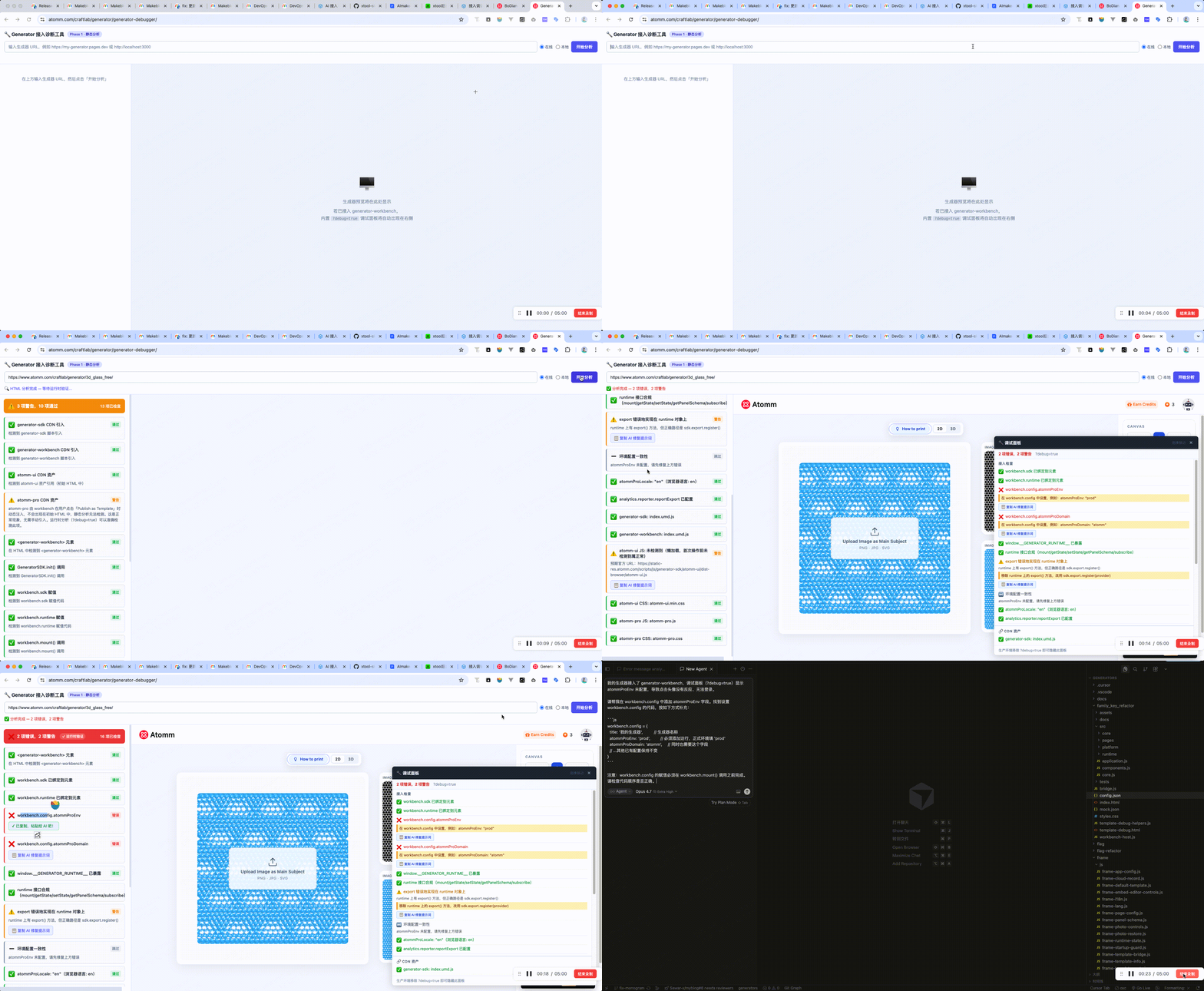
Online mode (default)
Open
https://www.atomm.com/craftlab/generator/generator-debugger/Paste the target generator URL into the input field (full URLs,
localhost, and bare hostnames are accepted —https://is auto-prefixed)Click Start Analysis or press Enter
The left panel cycles through these states:
- "⏳ Analyzing..." (~1 second)
- "🔍 HTML analysis complete — waiting for runtime verification..." (up to 15 seconds)
- "✅ Analysis complete — N errors, M warnings"
The right-side iframe loads the target generator at the same time (with
?debug=trueautomatically appended). If the generator is integrated correctly, its built-in debug panel will also appear in the bottom-right of the iframe.
Local mode + Bookmarklet
- Switch to the Local radio at the top of the tool page
- In the local-mode info card on the left, drag the 🔧 Atomm Diagnostic Tool link into your browser bookmark bar
- Open your local generator page and click the Atomm Diagnostic Tool bookmark
- A new tab opens back at the diagnostic page with the runtime checks already rendered
Quick link
The tool supports a ?url= query parameter that triggers analysis automatically:
https://www.atomm.com/craftlab/generator/generator-debugger/?url=https://my-generator.pages.devUseful for sharing in Lark / Slack — recipients click and immediately see the results.
Built-in Generator Debug Panel
Append ?debug=true to your generator page URL:
https://your-generator.pages.dev/?debug=trueAbout one second after the page mounts, a draggable debug panel (#__gw_integration_checker__) appears in the bottom-right corner.
When to use this
After integrating generator-workbench, if something is not working (avatar click unresponsive, Publish as Template dialog does not open, export does nothing, etc.), add ?debug=true first. The panel will tell you exactly what is misconfigured and how to fix it.
Debug only
Remove ?debug=true before going to production. The panel is lazily loaded — on a normal visit no debug code is downloaded, executed, or bundled.
Panel Layout
The panel has three sections:
┌─────────────────────────────────────────────────┐
│ 🔧 Workbench Integration Check            [×]  │  ← header (draggable)
├─────────────────────────────────────────────────┤
│  2 errors, 5 warnings              ?debug=true  │  ← summary bar
├─────────────────────────────────────────────────┤
│  INTEGRATION CHECKS                             │  ← ① Static + env/lang/analytics
│  ✅ workbench.sdk bound to element              │
│  ❌ atommProEnv not configured                  │
│     → Fix: set atommProEnv in workbench.config  │
│     📋 Copy AI Fix Prompt                       │
│  ⚠️  SDK env mismatch with atommProEnv          │
│  ⚠️  atommProLocale not set (browser: en-US)    │
│  ⚠️  analytics.reporter not configured          │
├─────────────────────────────────────────────────┤
│  🔗 CDN ASSETS                                  │  ← ② CDN Check (new)
│  ✅ generator-sdk: index.umd.js                 │
│  ✅ generator-workbench: index.umd.js           │
│  ⚠️  atomm-ui JS: not detected (lazy-loaded)    │
│     📋 Copy AI Fix Prompt                       │
├─────────────────────────────────────────────────┤
│  📤 PUBLISH PARAMS              14:23:07.334    │  ← ③ Publish Params
│  ✅ generatorImage  ✅ appKey  ❌ template       │
│                    📋 Copy AI Fix Prompt        │
│  { "generatorTag": "...", "initialData": {...} } │
│                                       [copy]    │
├─────────────────────────────────────────────────┤
│  📊 ANALYTICS                          (2)      │  ← ④ Analytics (new)
│  ✅ analytics.reporter.reportExport configured  │
│  14:23:08  [reporter] reportExport  action:...  │
│  14:23:05  [gtag]     click_export  {...}       │
├─────────────────────────────────────────────────┤
│  📡 LIVE EVENTS                        (3)      │  ← ⑤ Live Events
│  14:23:07.334  ● params_change  cover: ...      │
│  14:22:59.100  ● state-change   keys: x,y       │
└─────────────────────────────────────────────────┘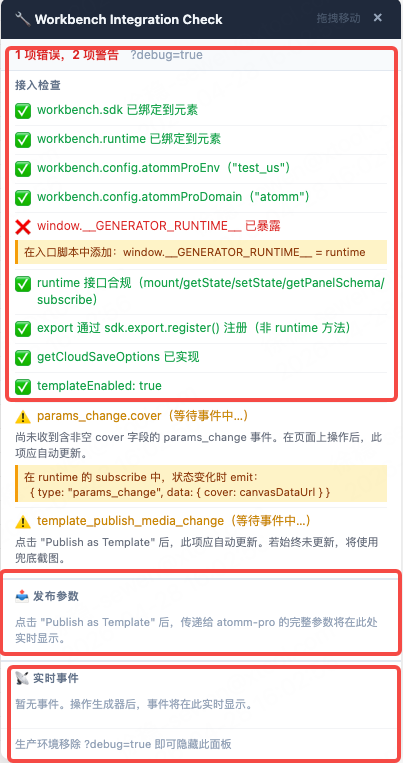
① Integration Checks
Runs immediately on page load. Verifies all required integration config is in place.
| Icon | Meaning |
|---|---|
| ✅ | Check passed |
| ❌ | Error — blocks functionality |
| ⚠️ | Warning — feature degraded but not crashed |
| ⏭️ | Skipped (prerequisite not met) |
Full check list:
| Check | Corresponding failure |
|---|---|
workbench.sdk bound to element | Avatar click unresponsive |
workbench.runtime bound to element | All runtime features broken |
atommProEnv configured | Avatar click unresponsive |
atommProDomain configured | Avatar click unresponsive |
window.__GENERATOR_RUNTIME__ exposed | Debug tooling broken |
| runtime interface compliant (mount/getState/setState/getPanelSchema/subscribe) | Multiple failures |
export registered via sdk.export.register() | Export button does nothing |
| SDK env matches atommProEnv | Auth / API environment mismatch |
| atommProLocale configured | Dialog language may not match target users |
| analytics.reporter configured | Export/publish actions not tracked |
getCloudSaveOptions implemented (cloud profile) | Cloud save title is undefined |
templateEnabled: true (template profile) | Publish as Template button missing |
params_change.cover (template profile) | Publish as Template dialog won't open |
template_publish_media_change (template profile) | Template preview image missing |
Every ❌ / ⚠️ item shows two helpers below it:
- Yellow fix suggestion — a short code snippet to copy directly into your code
- 「📋 Copy AI Fix Prompt」button — click to copy a comprehensive repair context to the clipboard, then paste it into any AI tool (Claude, Cursor, ChatGPT, etc.) to get an automatic diagnosis and fix for that specific check
② CDN Assets
The panel scans document.scripts and all link[rel="stylesheet"] elements at load time and checks whether the official CDN assets are present.
Assets checked:
| Asset | Official CDN URL |
|---|---|
| generator-sdk (ES) | .../generator-sdk/index.es.js |
| generator-sdk (UMD) | .../generator-sdk/index.umd.js |
| generator-workbench | .../generator-sdk/generator-workbench/index.umd.js |
| atomm-ui JS | .../atomm-ui/dist-browser/atomm-ui.js |
| atomm-ui CSS | .../atomm-ui/dist-browser/atomm-ui.min.css |
| atomm-pro JS | .../atomm-pro/dist-browser/atomm-pro.js |
| atomm-pro CSS | .../atomm-pro/dist-browser/atomm-pro.css |
Lazy-loading
atomm-ui and atomm-pro are lazy-loaded by the workbench on demand — atomm-ui when the workbench initialises, atomm-pro when the user opens the Publish as Template dialog. Seeing ⚠️ for these at panel startup is expected; they will flip to ✅ after the corresponding interaction.
If atommUiScriptUrl, atommProScriptUrl, or similar config overrides are set, the panel checks those custom URLs as well and labels them (custom).
Every ⚠️ entry has a「📋 Copy AI Fix Prompt」button for targeted troubleshooting.
③ Publish Params
Trigger: Every time "Publish as Template" is clicked, the panel captures the full payload that workbench sends to atomm-pro and displays it.
Quick-glance fields:
| Field | Icon meaning |
|---|---|
generatorImage | ✅ preview image present / ❌ empty (publish preview will be blank) |
generatorTag | ✅ template name present / ❌ empty (template published without a name) |
appKey | ✅ resolved / ❌ empty |
template | ✅ template data present / ❌ missing (template data will not be saved) |
template.generatorId | ✅ present / ❌ missing |
JSON view: The full payload is displayed as formatted JSON. Base64 image data is automatically truncated to [data-URI, 12453 chars] to keep the panel readable.
Copy button: Click copy in the top-right of the JSON block to copy the full raw payload (including complete base64 data) to the clipboard for comparison or further analysis.
「📋 Copy AI Fix Prompt」button: When a field displays ❌ (e.g. generatorImage, generatorTag, appKey, template), a「📋 Copy AI Fix Prompt」button appears next to it. Click it to copy a complete repair context for that missing field and paste it into any AI tool to get an actionable fix.
④ Analytics
A dedicated monitoring section for tracking events. The panel intercepts calls from three sources and logs them in real time:
| Source | Badge | Description |
|---|---|---|
analytics.reporter | [reporter] | Custom reporter configured in workbench.config.analytics.reporter |
window.gtag | [gtag] | Google Analytics 4 events |
window.sensors | [sa] | Sensor Analytics (神策) events |
First-line status:
- ✅
analytics.reporter.reportExport configured— events will be captured - ⚠️
analytics.reporter not configured— export/publish actions are not tracked
Event log format:
14:23:08 [reporter] reportExport {"action":"download"}Actions that trigger analytics events:
- Click Export button →
reportExport - Click Publish as Template →
reportPublishTemplateClick(if implemented) - Any
gtag('event', ...)orsensors.track(...)calls on the page
Not using analytics?
Ignore the ⚠️ if data tracking is not required. Click「📋 Copy AI Fix Prompt」on the warning to get full setup code for configuring a reporter.
⑤ Live Events
The panel subscribes to runtime.subscribe() and displays key events in real time. The log shows newest events at the top, up to 30 entries.
| Color | Meaning |
|---|---|
Green ● | Event OK (e.g. params_change carried a cover field) |
Red ● | Event problem (e.g. params_change had an empty cover) |
Monitored events:
| Event | Displayed info |
|---|---|
params_change | cover field length, or "cover field empty or missing" |
template_publish_media_change | whether generatorImage was provided |
select_template | selected template name |
state-change | up to 3 changed field names |
ready | runtime ready signal |
Live check updates: When params_change arrives with a cover field, the corresponding check in the Static Checks section automatically upgrades from ⚠️ to ✅ — no page refresh needed.
Copy AI Fix Prompt
This is the debug panel's core feature for AI-assisted development. Whenever a ❌ / ⚠️ check item or a missing publish param field appears, the panel renders a「📋 Copy AI Fix Prompt」button next to it.
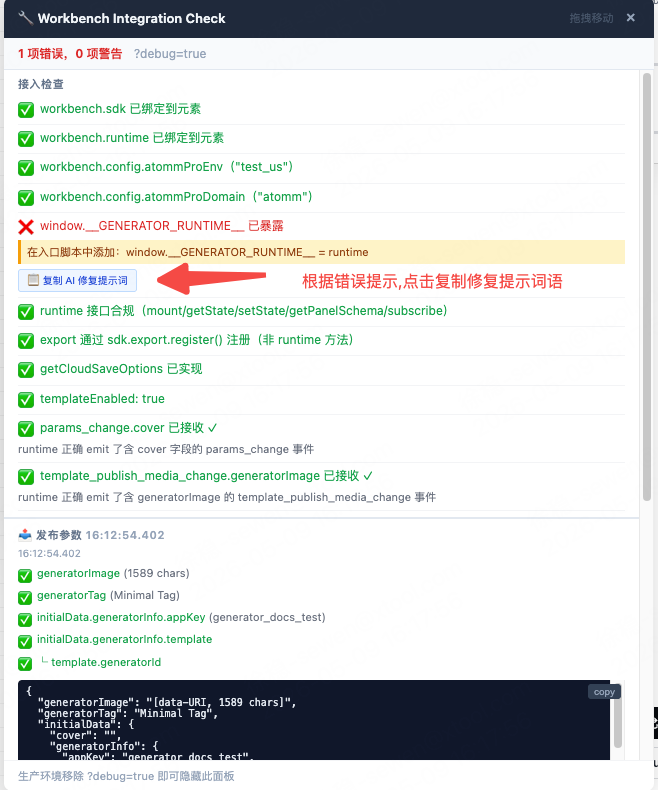
How to use
- Open the
?debug=truepanel and locate any ❌ or ⚠️ item - Click the「📋 Copy AI Fix Prompt」button next to it
- Switch to your AI chat (Claude, Cursor Chat, ChatGPT, etc.)
- Paste the prompt and send
- The AI will diagnose the root cause and return ready-to-use fix code
Supported checks
Integration checks (14 items):
| Check | Triggers when |
|---|---|
workbench.sdk not bound | workbench.sdk assignment missing or wrong order |
workbench.runtime not bound | workbench.runtime assignment missing or wrong order |
atommProEnv not configured | config.atommProEnv field absent |
atommProDomain not configured | config.atommProDomain field absent |
__GENERATOR_RUNTIME__ not exposed | runtime not mounted on window |
| runtime interface non-compliant | mount / getState / setState / getPanelSchema / subscribe missing |
| export not registered | sdk.export.register() not called |
| SDK env ≠ atommProEnv | GeneratorSDK.init({ env }) value does not match config.atommProEnv |
| atommProLocale not configured | config.atommProLocale absent |
| analytics.reporter not configured | config.analytics.reporter not implemented |
getCloudSaveOptions not implemented | cloud save config absent |
templateEnabled not set | config.templateEnabled is false or absent |
params_change.cover missing | runtime not sending cover in params_change event |
template_publish_media_change missing | runtime not emitting this event |
CDN asset checks (6 items):
| Check | Triggers when |
|---|---|
atomm-ui JS not detected | Normal before first interaction (lazy-loaded); investigate if still absent after |
atomm-ui CSS not detected | Same as above |
atomm-pro JS not detected | Normal before opening Publish as Template (lazy-loaded) |
atomm-pro CSS not detected | Same as above |
generator-sdk not detected | CDN not loaded, or using npm package (normal) |
generator-workbench not detected | CDN not loaded, or using npm package (normal) |
Publish param fields (5 items):
| Field | Triggers when |
|---|---|
generatorImage | Publish preview image is empty |
generatorTag | Template name is empty |
appKey | appKey not resolved |
template | Template data is missing |
template.generatorId | generatorId is missing |
View all prompt texts offline
To read the full text of all fix prompts offline, see the Integration Checklist → Debug Panel Quick Fix Prompts reference page.
Dragging the Panel
The panel starts fixed in the bottom-right corner. If it covers something you need to interact with, drag it by its title bar to any position:
- Cursor shows
grabwhen hovering over the title bar - Cursor shows
grabbingwhile dragging - The panel stays within the viewport bounds
- Position is preserved across panel refreshes caused by incoming events
Deactivating the Panel
Remove ?debug=true from the URL:
https://your-generator.pages.dev/ ✅ normal visit, panel not loadedThe debug code is dynamically imported — on a normal visit nothing is downloaded, executed, or bundled.
Related Docs
- Workbench Runtime Communication — full event protocol reference
- Generator Workbench — integration config overview
- Runtime Contract — runtime interface spec